Thursday, January 29, 2015

Carfree in Retirement

I had to stop driving several years ago when eyesight issues made it hazardous for me to get behind the wheel. Even though I had known it was coming, the loss of freedom and mobility that driving had always represented to me was hard to get used to. I was surprised, however, at how quickly I got used to get around without a car. The upside was, of course, that I found myself free of the rather large cost associated with owning and operating a car.

The AAA (American Automobile Association) annually figures costs for operating various kinds of vehicles. Last year, they found that owning and using a car ranged, on average, from $6,957 to $11,039, with small sedans being the least expensive and SUVs the most. This may have decreased a little, what with the lower gas prices we're seeing. And there are ways to lower your costs, most notably buying an older car for cash, so that you eliminate the monthly car loan payments (although that has a way of increasing the costs of repairs to keep your older car running.)

Even $6,000 a year is a big chunk of change. You can do a lot with an extra $500 a month! Some of us have the choice taken away from us. But I know that a lot of retired folks do elect to give up their cars so they can afford to live on a reduced income. It can be a smart decision, depending on a number of factors.

  • Availability of Public Transportation. When I was anticipating retirement, and thinking about where I might live, I was already very sure that it had to be somewhere that had decent public transportation. A non-driving friend of mine used to live way outside of town with one of her married children. It was a beautiful, upscale area, but a disaster for a non-driver. Not only were there no sidewalks, but in many places the narrow, windy country roads didn't even have a shoulder for pedestrian use. The nearest bus stop was nearly a half-hour away, and it was dangerous and at times nearly impossible to walk there, notably when the weather was bad. She became virtually a prisoner in her home. She has since moved into the city, which strained her limited budget, but which allows her to have a life. Personally, I have always been a big believer in public transportation, and so made sure I bought a home close to a major bus line that will take me downtown to the bus hub or the train station, from where I can go just about anywhere. It certainly made things a lot easier when I had to stop driving. 
  • Proximity to Local Shopping. Even when you have a bus line nearby, it's really nice to be able to walk to local stores to do at least some of your shopping. Walking as transportation is free and very good for your health. It's nice to just pop over to the market or drug store for a few things. For me, it's a 15-minute bus ride to the nearest supermarket. But I can also walk to a small discount market, several ethnic markets (Mexican, Italian, and Korean), two different dollar stores, two bakeries, a seafood market, a bank, a library, and many restaurants. To my mind, one of the most important elements in a happy, healthy, carfree retirement lifestyle is living in a neighborhood where you have the opportunity to do a lot of your shopping and errands without even having to take a bus. 
  • Safety. My ability to walk in my neighborhood without becoming a crime victim was another important consideration. Many neighborhoods in my city that offer low-cost housing and proximity to public transportation and shopping have unfortunately high crime rates. And seniors are often considered good targets by opportunistic criminals. You don't want to be afraid to leave your home. But I also found a number of modest-cost areas where crime is lower or minimal. It's pretty easy to find crime information, but I think the most accurate source was a local police officer. Local residents, on the other hand, gave me wildly inaccurate advice, usually greatly exaggerating the amount of crime in certain areas.
So I am happy to say that I was lucky to stumble on an area that has proved to meet my needs quite well. I have a major bus line that stops within a block of my home, lots of local shopping, and minimal crime. I wish I could say that I had been very clever and analytical in choosing this neighborhood, and I was to some small degree, but really there was a lot of luck involved. I know that if I had unwisely chosen an area where I had to walk blocks and blocks to the nearest bus stop, or that had no local shops or restaurants, or where I felt unsafe venturing outside, I'd be living a much less satisfying life.

Wednesday, January 28, 2015

The So-Called "Life" Section

I have my local newspaper delivered every day, and I habitually read at least some of it over my morning coffee. They tell us that print newspapers are rapidly dying, and that before long we'll have to get our news digitally, from our computers, tablets, or phones. I think that is a shame, and I suspect many of us retirement-age folks feel the same. Another day, perhaps I'll talk about why I so much prefer my print edition.

But lately I've been focusing on the so-called "Life" sections. Remember the Life sections from years back? I can remember when it was the "Women's Section." It was for the ladies, and the Sports section was for the gentlemen. I remember that the Women's section contained a lot of social reporting, with fascinating photographs: balls, parties, fundraisers, and a glimpse at the gowns or other attire of prominent attendees. On Wednesday there were recipes and grocery ads. And there were event schedules for all manner of things, from classes to organizational meetings to festivals and fairs. The TV and movie theater schedules could also be found there. There was a lot of local content, with informative columns provided by area educators, health professionals, gardening experts, and other people with pertinent information to share. Much of that is gone, now, or just isn't the same.

Not long back, our paper decided to focus reporting only on local news and politics, so now Section One is all local, and they give us a USA Today insert that provides national news, financial news, and a Life section that appears to assume that our lives consist almost completely of consuming commercial media. Today's Life page is 100% about TV and movies, shows and stars, plus a book review and super-short blurbs about an author and the 5 top best-selling books. That's it.

There's a longer USA Today "Life" section on Sunday... six pages of news about films, celebrities, what celebrities are wearing, blah, blah, blah. A page on travel, and a crossword puzzle. One short, inane article on "reaching your goals." This replaces a magazine insert that used to have some good recipes and useful articles along with a moderate amount of entertainment news.

Our daily local "Life" section is a bit longer, with daily themes: family, education, health, food, "style," and entertainment. We get a weather page, comics, a few puzzles, a list of today's celebrity birthdays (yawn) and occasional miscellaneous articles culled from national wire services. Sadly, almost all the local content is gone, especially anything that isn't virtually an advertisement. No more honest restaurant reviews, almost no reporting of social events. The kinda-ok local recipe column, which featured recipe requests from readers, was cut to every two weeks. There's usually a gardening column once a week, which sometimes has useful information, and a very abbreviated evening TV schedule.

Really, no wonder newspaper subscriptions are declining. In order to suck out the last penny of profit, managements have cut reporting, especially on non-political local and women's interest topics. Most are part of big media corporations, and I assume that fuels the reporting (advertising, actually) of so much entertainment news and gossip. They've abandoned pursuing their readers' interests in favor of pushing their own.

And I think that's really a shame. Historically, newspapers have been a source of local cohesion as well as information. With a print newspaper, you just pick it up and can quickly scan the hundreds of items on its pages, stopping to read more thoroughly only those things that are of interest. Local newsletters, blogs, Facebook pages, and websites have sprung up in an attempt to close the gap. But I've found that it's very time-consuming to pursue all those scattered sources. I've heard that attendance at many local functions has fallen off, as it has become more difficult to reach a wide audience. Newspaper advertising has become increasingly expensive, and readership is way down. There really are very few other ways to reach a lot of people. As a result, we miss out on many interesting opportunities.

For example, I was at the library recently and was practically dragged into the big meeting room by one of the librarians, who was trying to round up a few people to attend a lecture by two local authors. It was fascinating, but embarrassingly there were only a handful of people present, despite the fact that both authors are nationally known! It had been scheduled too late to go in the library's quarterly catalog, and they apparently couldn't figure out how to publicize it widely. Had they been able to do so, I'm sure the room would have been packed, as both authors are very popular here.

And this sort of thing is  happening on a daily basis. We learn all about national celebrities and the movies and TV shows, but we find out less and less about what is going on in our own communities (except sports and movie showings, of course). As a retiree on a limited income, I particularly like to find out about local low-cost or free events I can take advantage of. I guess I need to search for more online information sources. I hope these will burgeon as our local newspaper continues to drop the ball.

Tuesday, January 27, 2015

Frugal Snacking: Popcorn

Blizzard of 2015: Aftermath
Well, the much-heralded "Blizzard of 2015" has come and gone from my area. Instead of the foot of snow we were initially promised, we have a dusting. It did get pretty windy and nasty outside... hence the overturned yard chair. I understand it is much more of an event farther to the north and east. So no snow day for me... I'm was off to the library on foot to tutor, then later to Book Club.

Yesterday, though, I stayed warm indoors all day. I'd already run to the store on Sunday to replenish bread and milk supplies... a time-honored Delaware pre-snow tradition. I also did what some people admit to when they are anticipating being snowed in for even a short while: I stocked up on snack food. Adult beverages are also included in some people's ritual, but not mine... this time, anyway.

One of my favorite snacks is air-popped popcorn. It's healthful, high in fiber, free of additives, and very low in cost compared to chips and other crunchy snacks. I pay $2.99 for a 2-lb. bag of popping corn, about the cost of a big bag of chips. But I get many, many big bowls of popcorn from that 2 pounds. I usually top it with some melted butter and salt. Sometimes I add some Parmesan cheese or very finely grated sharp cheddar.

Caramel Popcorn
Yesterday, though, I was in the mood for something sweet, so I made caramel corn. There are a lot of recipes available on the internet, but I've always made a simple version that uses just brown sugar, butter, water, and salt. Plus, of course, popcorn. Here's the recipe I used yesterday:


Ingredients
  • About 2 quarts of air-popped, unsalted popcorn (approximately 1/4 cup kernels, unpopped)
  • 2 Tbsp. butter
  • 1 cup brown sugar, packed
  • 1/4 c. water
  • 1 tsp. salt

Method
  1. Pop the corn and place in a heatproof bowl or shallow, buttered pan.
  2. Melt the butter in a small saucepan, add brown sugar, salt, and water.
  3. Cook and stir brown sugar mixture over medium heat until boiling and foamy. Continue to cook, stirring constantly, until boiling liquid thickens slightly and begins to "sheet" off the spoon. A thinner syrup will cover the corn better but will be a little soft and sticky. Cooking a bit longer, till the syrup is a little thicker, yields a harder, less sticky caramel.
  4. Pour the caramel syrup over the popcorn, stirring constantly, to cover as much of the popcorn as possible. 
  5. Cool, stirring occasionally so the popcorn doesn't stick to the bowl or pan
As you can see from the picture, these proportions produce caramel corn that is partly covered and not overly sweet. You can vary the amount of syrup vs. popcorn to make it to make it to your taste. Cooking the syrup longer yields a harder caramel, but don't overcook or it will have a slightly unpleasant, burned taste. There are a lot of recipes on the internet for making a similar popcorn which you then bake in the oven to yield a crunchy caramel corn that is similar to Cracker Jax, but I like my version and besides, don't relish the extra step. You could add peanuts, other kinds of toasted nuts, coconut, diced dried fruit, or about anything that sounds good to you. 

As you can see, this is very fast to make, and is a great treat for yourself or for guests. My grandchildren really like it. And of course it is super frugal. I don't use the corn syrup (Karo) that some recipes call for, mainly because it's not something I normally keep in my cupboards. Keeping it simple also tends to keep it more frugal, I've noticed.

By the way, although I like the flavor and convenience of packaged microwave popcorns, they are very expensive per serving. And when I read that you end up ingesting some of the Teflon chemicals that they use in them, I completely gave them up. I've tried several air poppers, including one that you put in the microwave to use, but my favorite is one I got last year, a Presto. It is inexpensive, has held up well, and doesn't spew popped and unpopped kernels all over my kitchen like my previous popper did.

It was nice to have a little snow day yesterday. Staying in and cooking, knitting, and watching Inspector Morse on Netflix was nice for a day. But I'm not complaining that the big snows didn't quite make it here last night! Plus... no shoveling... yay!


Monday, January 26, 2015

My Secret Laundry Weapon

It's a nasty day, windy and with about an inch of snow on the ground, a bit more falling, and  several inches more to come tonight. Minor compared to the 2-3 feet forecast for New England, but still... Anyway, I decided it is a good day to stay in and catch up on laundry.

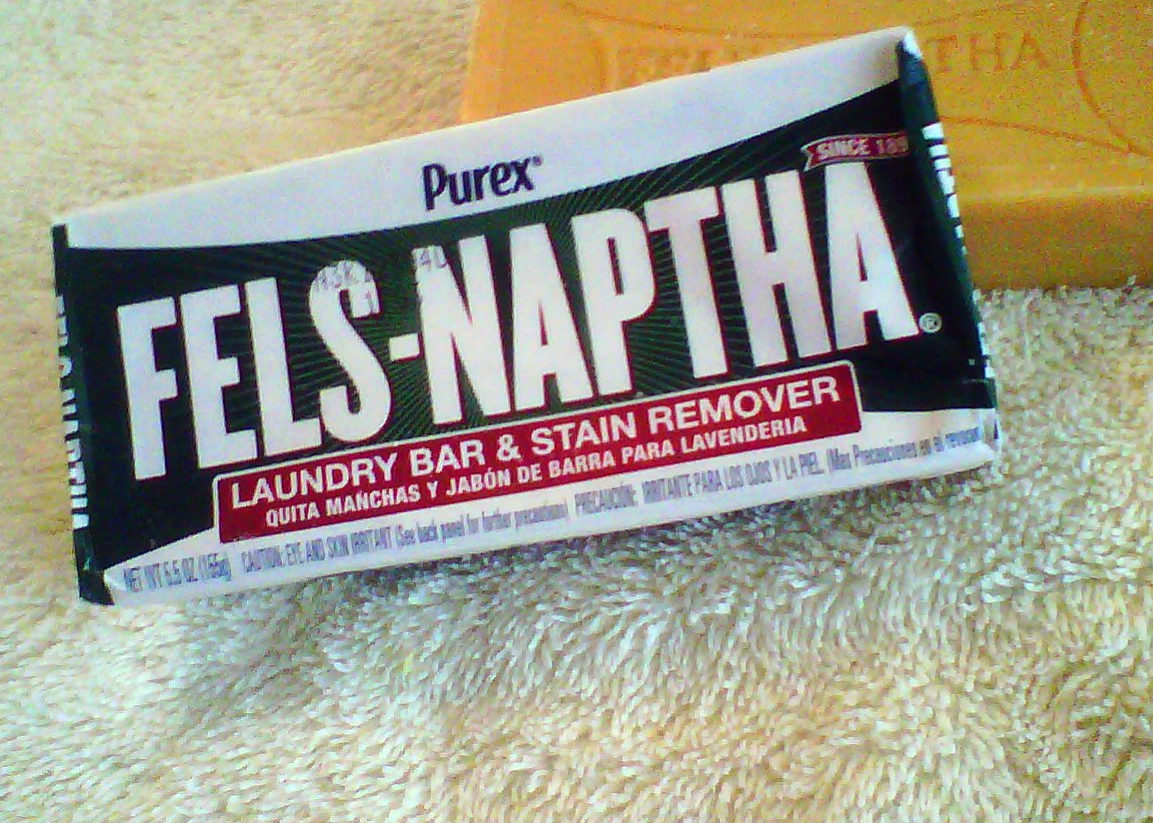
I've started with white, long-sleeved turtlenecks, which I wear regularly under sweaters in the winter. The cuffs always get so grimy! So, before washing, Fels-Naptha to the rescue.

I remember my mother using the same golden yellow bar of smelly soap to pre-treat our play clothes before washing. For the past ten years, I've been using it too. It works really well for getting stains out of clothing. I just wet the stained area, rub the bar of Fels-Naptha over the stain, rub it into the cloth with a brush if it is very badly stained, and let rest for a half-hour or so before laundering.

I'm told it's also very good for removing poison ivy or poison oak sap from your skin, which will make the rash heal a lot faster, or even prevent it if you get the sap washed off soon enough.

I've used Shout, oxygen cleaners, and other grocery store products to enhance stain removal, but I don't think any work as well as Fels-Naptha, which is also considerably cheaper. You can also use it on greasy kitchen items... pans, range hoods... on which  dish detergent just isn't quite cutting it. I buy inexpensive laundry and dish detergents, which aren't always the best for cutting stains and grease. With a bar of Fels-Naptha on hand, however, I can usually get clean clothes without having to spring for the expensive detergent brands.

Fels-Naptha was first manufactured in 1893 in Philadelphia, and originally contained Stoddard Solvent. It is now made by the Dial Corporation and no longer contains the solvent, which was a fairly strong skin and eye irritant. Some skin and eye irritation are still potential hazards, however, as with any alkaline soap product, so it shouldn't be used on your skin on a regular basis. I find the minimal contact from treating laundry drys out my hands, so I try to remember to rub in a bit of lotion or olive oil after use.

It used to be possible to buy Fels-Naptha at any grocery or drug store, but lately I've found it hard to find. A couple years ago I lugged a dozen smelly bars home with me on the bus from the one, distant, grocery store in my area that still carries it. Last year I bought a case of 24 bars from Amazon.com, at a cost that was a bit more than what I paid previously, but at least shipping was free with my Prime membership (and they delivered it to my door - no bus fare required).

Fels-Naptha is available online from quite a few vendors, but some of the prices are ridiculously high! Soap.com, for example, was selling bars for several dollars apiece. I paid about $1.53 per bar by buying in bulk. It doesn't go bad or take up much storage space, so that worked for me. Keep in mind that it does have an odor, so you don't want to store it in bulk where that would be a problem. Mine is in the basement.

Finding products like Fels-Naptha doesn't save large amounts of money. It is cheaper (and works better) than other stain treatment products I've tried, and also allows me to use less expensive detergents for clothes and dishes. No, not a big savings. It's just that when you make dozens of buying discoveries like this, they can really add up.

Sunday, January 25, 2015

How I Keep Track of My Money

As a major snowstorm bears down on my area on this late January Sunday, I've been doing some lazy day catching up, including making sure I've gotten all my bills paid for the month. I have a very simple, cost-free way to do this that I've worked out over the past eight years. I is just a simple set of Google spreadsheets where I collect all my data. You could do this on paper, but I like that this adds and subtracts everything for me so I don't have to use a calculator (or worry about addition mistakes).

The less money I have, the more important it seems to be to keep good track of it! And with all the hacking and scamming going on out there, the more important it is to check your accounts often - bank, credit cards, and so on. The easiest way I've found is to do it all online. I check my upcoming bills and bank balances weekly, and credit card stuff two to four times a month. That way I can jump on problems quickly, and make sure I'm never overdrawn, overdue, or over limit. Banks make a ton of money off late fees, overdraft fees, and so on. I'd just as soon they don't get any of my money, thank you very much.

Now, over the years I tried out all kinds of the software for keeping track of my money, bill payments, savings, etc. Microsoft Money was probably my favorite, but it got clunkier and more confusing over the years, as it got more complicated. And it took up a lot of time to keep it current. It was weighted down with a many features I did not need.

At some point I decided to just set up a Microsoft Excel spreadsheet to keep track of my finances. I started with one sheet for the current month and then added a sheet for each succeeding month. As time went on, I added more features, made changes, added some colors. It's still very simple, but it's fast and works very well for my admittedly simple finances. A few years ago I transferred it all to Google Spreadsheets, so it's all online. I keep a year's worth of spreadsheets in a single workbook, and then start a new workbook each January by making a copy of the current workbook and then changing the dates and updating.  Here's a sample page:


Below this most-used portion of the spreadsheet, I have sections for other bank accounts and even cash (although I haven't been keeping that current - I don't use cash much). I feel guilty about that.

This allows me to capture and predict the bills I have to pay each month. When I start each year's workbook by making a copy of the past year's, things like annual property taxes, insurance payments, and quarterly utility payments are automatically in the correct month. I then erase all the checking account entries from the past year, and adjust for any changes that have occurred since last year - new bills, new monthly amounts for internet and newspaper for example. Some bill amounts I won't know in advance, like utility and credit card bills. But at the beginning of the month I check each account online and predict, and then fill in the "official" amount when the bill arrives.

I also predict how much I think I will spend on the usual stuff: groceries, gifts, etc., and the spreadsheet adds this to the predicted bill payments, and puts the total in "estimated total outgo". The following "actual" field keeps track of all the expenditures from checking. Then the "difference" field shows me how much more I have to spend, or by how much I've exceeded my estimated budget.

The checking section is maintained regularly, with each check, check card purchase, or other electronic payment from checking entered, along with the date and what the payment was for. The amount shown in the header, right of "starting balance," is the account balance at the beginning of the month. I also enter income, such as my Social Security check and anything else that happens to show up, in a separate column just right of the column for expenditures. Every week I log in to my bank's website and check off items as they appear (in the "x" column), and balance their total with mine. The column to the left of the "x" column is my checkbook total. This way I can keep my checkbook balanced and up-to-date, as well as check for any charges I failed to enter or even bogus ones.

I also enter into the check list bills that will be paid later in the month, even amounts that are only estimated (I change them to the exact figure later, when the bill comes in). The amount shown in the header just right of "date" is a predicted account total for the end of the month, minus groceries and other miscellaneous debits from shopping, for instance, as it incorporates the predicted future entries, both expenditures and income. 

Another thing I do now, to keep track, is to add in credit card purchases in the top section of next-month's spreadsheet for each card. I always pay off credit card balances in full, so this lets me keep track of what my upcoming credit card payments will be.

Whew! Seems complicated, but it really isn't. For me, it's lightening-fast and makes balancing my accounts a matter of just minutes. Because I built it, I can change it any way I want. For a while I added columns to keep track of what I was spending on food, pet expenses, and other household expenses. It's been easy to go back and find specific information I've needed, too. It's maddening, though, to go back and see how much my Comcast bill has gone up over the last few years!

This method wouldn't be for everyone. I'm retired and don't have a lot of investments or other complications that the big financial software programs are really built for. I don't even have to itemize deductions, so record keeping for tax purposes is no longer an issue. But because I have dates and payees, and I save my receipts, it's easy enough to go back and retrieve information for purchases or other expenditures. You don't have to be a spreadsheet whiz to use this kind of system, as it uses only very simple summation formulas. You could make the spreadsheets do much, much more if you wanted to.

I've found that this easy little method really has allowed me to achieve more control over my money and how I spend it. I haven't paid a bank fee or even any interest in years! I can see right away when I'm spending too much in a given area. I always know where my money is and what's coming up. And since use of Google Docs is free, as is Google cloud storage for documents and spreadsheets created in their formats, it doesn't cost me a thing! This is what I really like: frugal AND better.